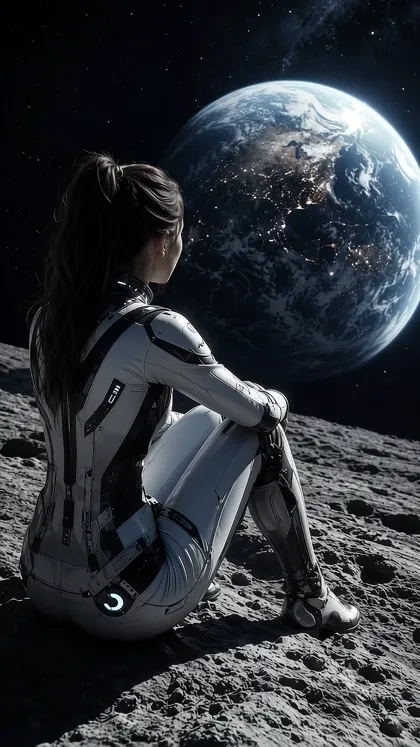
Universal Image-to-Video: Moon to Storefront Cinematic Journey
Step 1 - add first and last frame in flow Step 2 (use this video prompt to generate) - # UNIVERSAL IMAGE-TO-VIDEO PROMPT ## A Seamless Cinematic Journey from Any First Image to Any Last Image **DURATION:** 6–8 seconds **ASPECT RATIO:** 16:9 horizontal for every image and video generation **STYLE:** Ultra-photorealistic, cinematic, blockbuster-quality VFX, premium commercial realism. ### 1. USER-PROVIDED REFERENCES - **START FRAME:** The user's uploaded first image. - **DESTINATION REFERENCE:** The user's uploaded last image. Automatically analyze both images and adapt the camera journey to their actual subjects, environments, lighting, perspective, and visual characteristics. Do not assume any particular location, person, building, product, or storyline. The prompt must work with any combination of first and last images. ### 2. GENERATION SETTINGS - **Aspect ratio:** 16:9 for every image and video generation. - **Video length:** 6–8 seconds is a strong starting point for a fast reveal. - **Start frame:** Use the uploaded first image as the exact starting point. - **Destination reference:** Use the uploaded last image as the final destination. - **Camera behavior:** One uninterrupted forward move with no cuts or teleportation. - **Acceleration:** Extremely rapid acceleration when transitioning between distant environments, creating strong forward momentum and dramatic scale compression. - **Final second:** Settle into a clean, stable hero shot matching the destination reference. - **Reference preservation:** Preserve the first and last images as closely as the video generator allows. ### 3. MASTER VIDEO PROMPT Create one continuous, ultra-photorealistic cinematic shot that begins with the exact uploaded first image and travels toward the exact scene shown in the uploaded last image. The entire video must feel like a single virtual camera journey through a coherent visual world. Automatically determine the most suitable route, camera direction, movement speed, and transition effects from the supplied images. Preserve the opening image's original composition, subjects, poses, colors, lighting, and recognizable details. Do not redesign the opening scene. Move rapidly toward the destination using physically believable perspective, strong forward momentum, realistic parallax, and dramatic scale compression. Bridge differences between the two environments with context-appropriate cinematic transitions. Depending on the references, these may involve aerial travel, atmospheric haze, cloud penetration, architectural fly-throughs, landscape movement, foreground wipes, or other natural visual transitions. Do not force a particular transition when it does not fit the images. As the camera approaches the destination, progressively reveal the actual subjects, environment, architecture, products, and other defining details of the last reference image. The destination must not be replaced with a generic or invented alternative. Preserve recognizable faces, clothing, object proportions, architecture, logos, and readable signage wherever possible. During the final second, decelerate smoothly and settle into a clean, stable hero shot that closely matches the uploaded last image. Keep the composition completely steady through the final frame. ### 4. CAMERA MOVEMENT AND TIMING **Opening — 0.00–0.70 seconds** Start with the uploaded first image. Preserve its composition and visual identity. Hold briefly, then begin a subtle forward movement. **Acceleration — 0.70–1.70 seconds** Add extremely rapid acceleration with strong forward momentum and dramatic scale compression. The camera should travel purposefully toward the destination, not merely zoom in place. **Transition — 1.70–3.35 seconds** Move continuously between environments. Adapt the transition to the actual images, maintaining believable perspective, lighting, and direction of travel. **Destination approach — 3.35–5.15 seconds** Reveal the destination progressively. Increase environmental detail and foreground-to-background parallax as the camera approaches the final subject or scene. **Final reveal — 5.15 seconds to the end** Gradually decelerate into a clean, frontal or otherwise reference-matched hero composition. The final second must be stable, with no further camera movement or scene changes. *Timing note: These timestamps are a guide for a 6-second version. For an 8-second generation, extend the transition and destination approach while preserving the final stable second. Follow the generator's actual duration setting.* ### 5. VISUAL QUALITY REQUIREMENTS - One uninterrupted camera move. - No cuts, teleportation, or obvious scene transitions. - Strong forward momentum and convincing acceleration. - Physically believable perspective and spatial continuity. - Realistic lighting, reflections, textures, shadows, and environmental effects. - Natural exposure changes during transitions. - Motion blur only during fast movement. - Straight architectural lines and realistic building geometry. - Faithful subject appearance and destination details. - A sharp, stable final hero shot. - No unrequested text, watermarks, logos, or black bars. ### 6. QUICK FIXES IF THE GENERATION DRIFTS **Problem: The camera moves too slowly** Add: "Extremely rapid acceleration from the starting environment, strong forward momentum, dramatic scale compression, high-speed cinematic travel." **Problem: The video cuts between scenes** Add: "One uninterrupted continuous shot, absolutely no cuts, no scene transitions, no teleportation. Maintain continuous camera motion throughout." **Problem: The destination store, building, or subject looks different** Add: "Strictly match the final architecture, subject appearance, composition, colors, proportions, signage, and defining details to the uploaded destination reference. No redesign or substitution." **Problem: Buildings or objects become warped** Add: "Rigid, realistic architecture and object geometry. Straight lines remain straight. Preserve structural proportions. No bending, melting, duplication, or morphing." **Problem: Atmospheric transitions look fake** Add: "Realistic atmospheric haze, physically believable cloud volume where appropriate, natural exposure changes, accurate depth, and smooth environmental continuity." **Problem: The final frame keeps moving** Add: "Complete camera deceleration before the final second. Lock the camera into a completely stable hero composition matching the destination reference. No further movement." **Problem: The opening image changes** Add: "Use the uploaded first image as the exact opening frame. Preserve the original subject, pose, composition, lighting, colors, and environment. No redesign." ### 7. NEGATIVE PROMPT No jump cuts, no hard cuts, no teleportation, no scene skipping, no random location changes, no generic destination substitution, no distorted faces, no identity changes, no altered clothing, no warped buildings, no melting objects, no duplicated subjects, no incorrect logos, no misspelled signage, no invented text, no excessive camera shake, no random zoom reversals, no unrealistic perspective, no flickering lights, no abrupt exposure changes, no artificial white flashes, no unwanted watermarks, no black bars, and no aspect-ratio changes. ### 8. FINAL OUTPUT CONDITIONS The video must begin with the user's uploaded first image and end with the user's uploaded last image. Automatically adapt the journey to the content of both images without assuming a particular destination, location, subject, or narrative. Prioritize image fidelity, continuous camera movement, realistic acceleration, coherent transitions, and a stable final reveal. **One continuous cinematic journey. Any first image. Any last image. No cuts. Fast forward movement. Stable final reveal.**