Compact Pod to AH-64 Apache Mechanical Transformation
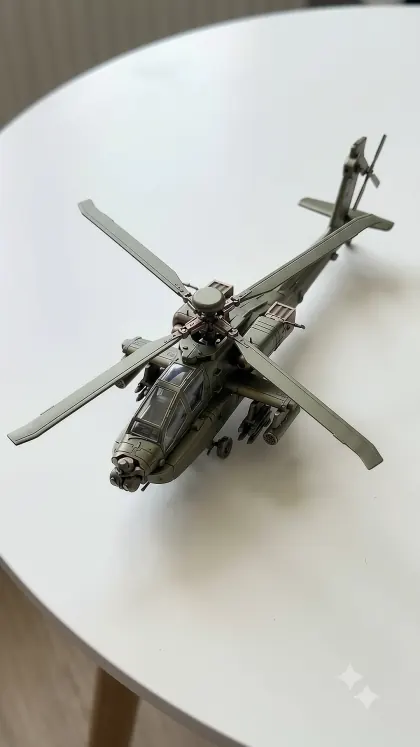
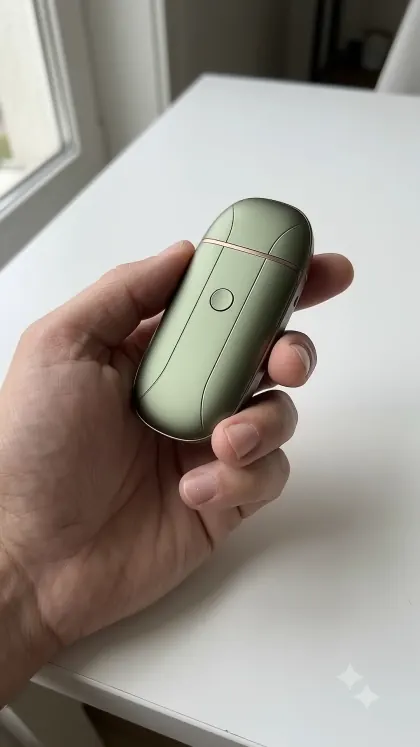
IMAGE PROMPT 1 Compact Device : - Photorealistic first-person POV looking down at a single hand holding a sealed compact mechanical pod, captured as if on an iPhone 15 Pro Max. The pod is a smooth, flattened oval capsule with a matte military olive-green metallic finish and muted bronze highlights. Its sealed exterior shows only delicate panel seam lines and a small recessed button on top. No rotor blades, cockpit shapes, weapon mounts, tail boom, or recognizable helicopter features. One hand holds the device naturally, with the other hand completely outside the frame. A clean white tabletop is visible below. Soft natural daylight, realistic skin texture, shallow natural depth of field, slight handheld sway, authentic phone-camera lens character, portrait orientation, no studio strobes, no background clutter, no text, no labels, no watermark. IMAGE PROMPT 2 Fully Transformed : - Photorealistic first-person POV looking down at a fully transformed miniature mechanical AH-64 Apache helicopter resting on the exact same clean white tabletop as the compact device image, as if photographed in the next moment of the same iPhone 15 Pro Max video. The helicopter is roughly 1.5 to 2 times the size of the compact olive-green flattened oval capsule. Maintain the same matte military olive-green metallic finish with muted bronze highlights on every component. Show the distinctive tandem cockpit with two transparent miniature canopies, narrow armored fuselage, detailed nose sensor turret, stub wings, twin engine housings, articulated four-blade main rotor, long tail boom, vertical tail fin, tail rotor, miniature landing gear, and visible mechanical joints. The main rotor blades and tail rotor must be fully unfolded and individually distinguishable. The helicopter must appear to be a meticulously engineered miniature transforming metal toy. No hands in frame. Soft daylight, natural shadows, realistic metallic reflections, shallow depth of field, authentic iPhone 15 Pro Max camera character, portrait orientation, no background clutter, no text, no labels, no watermark. VIDEO PROMPT Transformation Sequence : - [Style: hyper-realistic, handheld POV, shallow depth of field, soft natural daylight, matte military olive-green metallic finish, precision mechanical engineering, ASMR mechanical sounds, no music, portrait orientation] A single hand holds a smooth, sealed, flattened oval mechanical pod finished in matte military olive-green metal with muted bronze highlights. The camera looks down from a natural first-person POV, with gentle handheld sway and authentic iPhone 15 Pro Max phone-camera character. A clean white tabletop is visible below. The pod has delicate seam lines and one recessed button on top, with no recognizable helicopter features. The thumb presses the button, producing a clean click followed by a low servo hum. The hand places the pod on the white tabletop and withdraws completely. The pod shudders as the upper shell separates into curved armor panels. A narrow central fuselage extends upward, and the front section unfolds into the Apache's distinctive sensor-equipped nose. Two cockpit compartments rise one behind the other, and their miniature transparent canopies rotate open before locking into place. Twin engine housings lift from either side of the upper fuselage, exposing small turbine details. Stub wings extend sideways, with compact mechanical attachment points unfolding beneath them. A long tail boom telescopes backward, revealing articulated segments that align and lock. The vertical tail fin unfolds, and the tail rotor's hub extends as individual blades pivot outward and click into place. Above the fuselage, a rotor mast rises from the central compartment. Four long main rotor blades unfold sequentially from the hub, rotate into a precise cross-shaped arrangement, and lock with crisp metallic snaps. Landing gear struts telescope downward and their wheels rotate into place. The nose sensor turret pivots into position, while protective olive-green panels close around the internal mechanisms. Every part maintains the same matte olive-green metallic finish with muted bronze highlights. The helicopter settles firmly on the tabletop with a final locking clunk, its main rotor stationary and fully deployed. The camera drifts slightly closer to reveal the tandem cockpit, rotor assembly, tail rotor, sensor turret, and detailed mechanical joints. The completed miniature remains roughly 1.5 to 2 times the size of the original compact pod. Natural handheld sway continues, soft daylight remains consistent, no hands during the final reveal, ASMR mechanical clicks, sliding metal, and servo sounds only, no music, no cuts, no text, no labels, no watermark.